

layout과 view를 함께 사용하면, 하나의 화면 안에서 검색–목록–상세–요약 패널을 나누어 배치하고URL 쿼리(
q, orderId)를 기준으로 모든 패널이 같은 대상을 바라보도록 만들 수 있습니다.
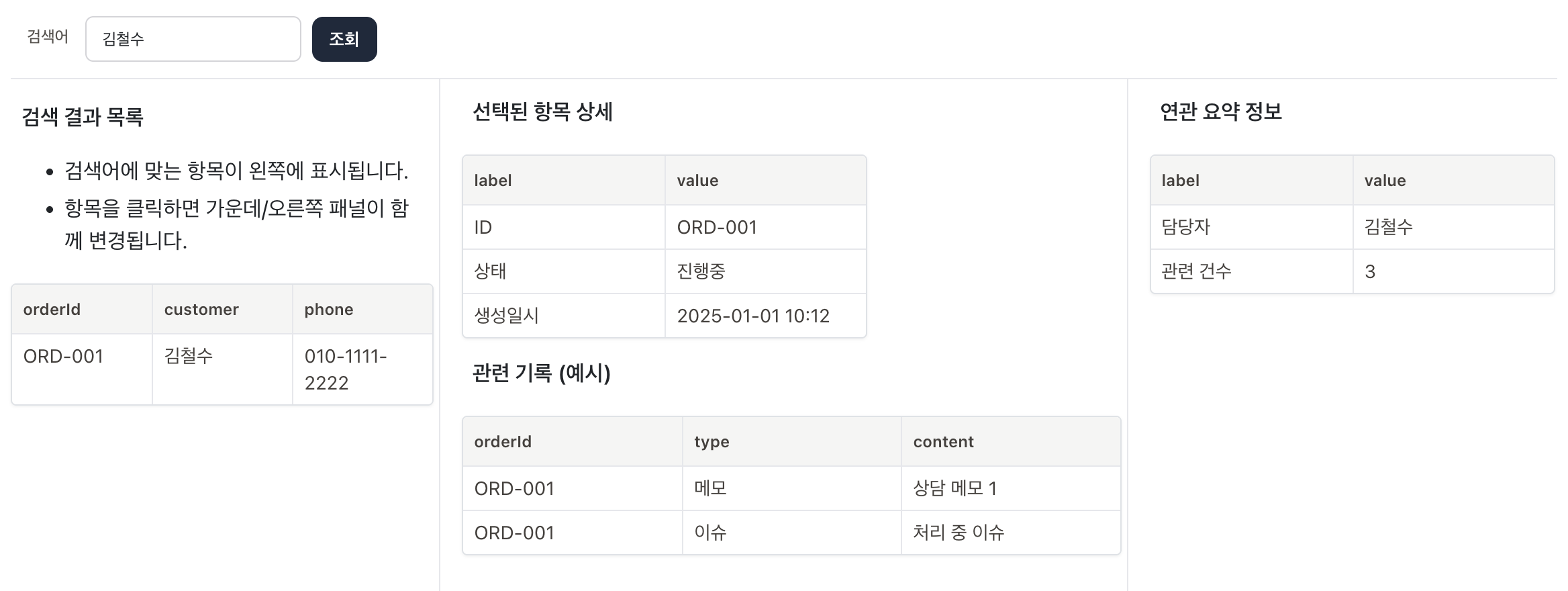
state:
  q: ''

blocks:
  - type: layout
    top:
      class: border-b
    left:
      width: 320px
      class: border-r min-h-[90vh]
    center:
      class: border-r grow
      width: 520px
    right:
      width: 320px

  # 검색 영역
  - type: view
    name: top
    blocks:
      - type: search
        placeholder: '주문번호, 고객명 또는 전화번호로 검색'
        params:
          - key: q
            label: 검색어
        onSubmit: |
          opt.$router.push({
            query: {
              q: opt.state.q,
              orderId: ''
            }
          })
        buttons:
          - label: 조회
            clickFn: |
              opt.$router.push({
                query: {
                  q: opt.state.q,
                  orderId: ''
                }
              })

  # 목록 영역
  - type: view
    name: left
    routeQuery: q
    class: pt-1
    blocks:
      - type: markdown
        content: |
          **검색 결과 목록**
          - 검색어에 맞는 항목이 왼쪽에 표시됩니다.
          - 항목을 클릭하면 가운데/오른쪽 패널이 함께 변경됩니다.
      - type: table
        full: true
        headers:
          orderId:
          customer:
          phone:
        rowClickFn: |
          const { row } = opt;
          const route = opt.$router.currentRoute || {};
          const q = route.query?.q || '';
          opt.$router.push({
            query: {
              q,
              orderId: row.orderId
            }
          })
        fetchFn: |
          const keyword = (params.$route.query?.q || '').trim();

          const allOrders = [
            { orderId: 'ORD-001', customer: '김철수', phone: '010-1111-2222' },
            { orderId: 'ORD-002', customer: '이영희', phone: '010-3333-4444' },
            { orderId: 'ORD-003', customer: '박민수', phone: '010-5555-6666' },
          ];

          if (!keyword) return allOrders;

          return allOrders.filter(row =>
            row.orderId.includes(keyword) ||
            row.customer.includes(keyword) ||
            row.phone.includes(keyword)
          );

  # 중앙 상세 영역
  - type: view
    name: center
    routeQuery: orderId
    visibleQuery: orderId
    suspense: |
      <div class="m-5 text-[13px] font-medium text-stone-500">
        항목을 선택하면 상세 정보가 표시됩니다.
      </div>
    blocks:
      - type: markdown
        content: |
          **선택된 항목 상세**

      - type: table
        autoHeader: true
        fetchFn: |
          const orderId = params.$route.query?.orderId;
          if (!orderId) return [];

          const orderInfoDB = [
            { orderId: 'ORD-001', status: '진행중',  createdAt: '2025-01-01 10:12' },
            { orderId: 'ORD-002', status: '완료',    createdAt: '2025-01-02 09:01' },
            { orderId: 'ORD-003', status: '요청중',  createdAt: '2025-01-03 14:30' },
          ];

          const found = orderInfoDB.find(o => o.orderId === orderId);
          if (!found) return [{ label: '안내', value: '데모 데이터에 없는 항목입니다.' }];

          return [
            { label: 'ID', value: found.orderId },
            { label: '상태', value: found.status },
            { label: '생성일시', value: found.createdAt },
          ];

      - type: markdown
        content: |
          **관련 기록 (예시)**

      - type: table
        full: true
        autoHeader: true
        fetchFn: |
          const orderId = params.$route.query?.orderId;
          if (!orderId) return [];

          const historyDB = [
            { orderId: 'ORD-001', type: '메모',   content: '상담 메모 1' },
            { orderId: 'ORD-001', type: '이슈',   content: '처리 중 이슈' },
            { orderId: 'ORD-002', type: '메모',   content: '추가 요청 없음' },
          ];

          return historyDB.filter(h => h.orderId === orderId);

  # 오른쪽 요약 영역
  - type: view
    name: right
    routeQuery: orderId
    visibleQuery: orderId
    blocks:
      - type: markdown
        content: |
          **연관 요약 정보**

      - type: table
        autoHeader: true
        fetchFn: |
          const orderId = params.$route.query?.orderId;
          if (!orderId) return [{ label: '안내', value: '선택된 항목이 없습니다.' }];

          const summaryDB = [
            { orderId: 'ORD-001', owner: '김철수', total: 3 },
            { orderId: 'ORD-002', owner: '이영희', total: 1 },
            { orderId: 'ORD-003', owner: '박민수', total: 2 },
          ];

          const found = summaryDB.find(s => s.orderId === orderId);
          if (!found) return [{ label: '안내', value: '요약 정보를 찾을 수 없습니다.' }];

          return [
            { label: '담당자', value: found.owner },
            { label: '관련 건수', value: String(found.total) },
          ];